


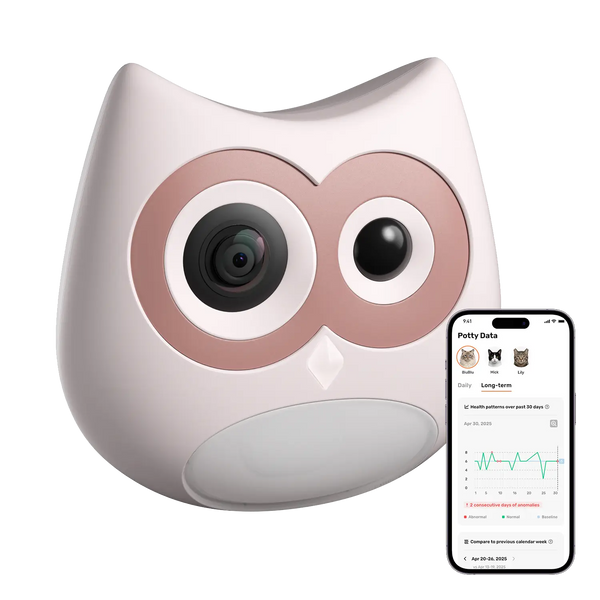
A multi-cat litter box camera such as SiiPet LitterLens combines visual AI with owner-confirmed event labels. After profiles are created, the system links detected visits to the most likely cat and keeps each cat’s activity in a separate history. Early confirmations help the camera learn, while uncertain or incorrect matches can be reassigned. This gives multi-cat households a practical way to see which cat visited, review the visit video, and compare that cat’s litter box routine or visible stool over time.
Why Is Litter Box Tracking Difficult in a Multi-Cat Home?
When several cats share a litter box, stool and urine clumps do not show which cat produced them. Even when an owner notices more frequent visits, a longer stay, or a change in stool appearance, identifying the cat involved can be difficult.
The uncertainty increases when cats use the box overnight, while the household is away, or shortly after one another. A general pet camera may preserve footage, but the owner still has to find the relevant clip and determine which cat appears in it.
LitterLens reduces that uncertainty by organizing detected visits around individual cat profiles. Instead of reconstructing events after the litter box has been cleaned, owners can review each cat’s activity in a separate history.
How Does an AI Camera Learn Each Cat’s Identity?
With SiiPet LitterLens, owners first create a profile for each cat using the cat’s name, photos, and basic information. These details establish the profiles, while actual litter box visits give the visual AI additional examples from the camera’s installed position.
During the early learning period, the app may recognize that a cat entered without confidently assigning the event. The owner can confirm which cat appeared, helping the system associate later visits with the correct profile. Uploading a profile photo begins the process, but continued organization develops through real visit footage and confirmed events.
One account can create profiles for up to 10 cats. For optimal recognition performance, SiiPet recommends monitoring up to six cats. Because identification is visual, cats do not need to have different body weights to maintain separate profiles.

Can It Tell Similar-Looking Cats Apart?
Similar coats, body shapes, or partially blocked views can make early identification more difficult. A stable camera position and a clear view of the cat give owners better footage to verify when an assignment needs attention.
In a sponsored video, Chan’s Tech Review shared his experience using LitterLens in a nine-cat home that included three similar-looking orange cats. The first day included several identity mix-ups. After he confirmed the cats shown in those events, he observed that matching had improved noticeably by the second day.
This experience shows how owner confirmation can provide useful examples for look-alike cats. It does not establish a fixed training period for every household. Homes with similar-looking cats may need additional early confirmations before events are organized consistently.
Per-Cat Records Create a Clearer Litter Box History
Identification becomes useful when it organizes meaningful evidence instead of simply attaching a name to a notification. For each detected visit, LitterLens can bring together:
- Cat identity and visit time
- Visit duration and frequency
- Visit video: A video clip of every detected litter box visit
- Visible stool photo: A separate photo when the camera has a clear view of visible stool
- Care+ analysis and alerts: Supported abnormal stool and litter box habit analysis
The distinction between visit videos and stool photos is important. LitterLens records video for every detected visit, whether the cat urinates or defecates. It separately captures a photo when visible stool can be seen clearly.
Urination behavior or urine may appear in ordinary visit playback when the camera has a clear view. The system does not automatically classify visits as urination or defecation, create a separate urine photo, measure urine output, or analyze urine.
Once these records are organized by cat, an owner can review whether one cat:
- Made several short visits
- Stayed longer than usual
- Began visiting more often at night
- Showed different posture or bathroom behavior
- Produced unusual-looking stool once or across several events
Care+ can flag supported stool and litter box habit changes, directing the owner to an event worth reviewing. This reduces the need to search manually through the complete history while preserving the underlying photo or video context.
These records may also provide more specific information for a veterinary conversation, particularly when it would otherwise be difficult to determine which cat’s behavior or visible stool changed. They can document what happened and when it began, but they do not determine the medical cause or replace veterinary care.

How Much Human Review Does Multi-Cat Identification Require?
Human review is intended to be occasional rather than a separate tracking routine. When the app presents an uncertain event or the owner notices an incorrect assignment, the event can be confirmed or manually reassigned within the existing history. No parallel spreadsheet, daily audit, or manual litter box log is required.
How Do Multiple Litter Boxes Affect Camera Coverage?
Each litter box camera observes the litter area within its own field of view. If cats regularly use several boxes, one camera cannot record activity occurring at another location. Camera coverage should therefore follow the boxes that matter in the household’s routine.
- Start with the most frequently used box to establish practical initial coverage.
- Add a camera to each regularly used box when more complete coverage is needed.
- Manage multiple LitterLens cameras in the same app so each cat’s events remain accessible in one system.
For a traditional box, the camera needs a stable mounting point and a clear view of the primary litter area. LitterLens can also work with many automatic litter boxes when a suitable mounting position is available.
In the video, Chan’s Tech Review opened Live View before fixing the adhesive mount so he could test the camera angle and coverage first. The same approach can be used for each box: confirm the view before securing the mount.
For an automatic litter box, the camera and mount must remain clear of the entrance, rotating globe, rake, door, sensors, and other moving parts. Compatibility should be checked for the specific design rather than assumed for every automatic litter box. Owners who are uncertain about a particular model can contact service@siipet.com.
Choose the Right Litter Box Camera for Your Multi-Cat Home
To build a clearer history for each cat, add LitterLens to the litter boxes your cats use most. Create a profile for each cat, check the camera angle in Live View, and confirm any uncertain early matches. LitterLens can then organize detected visits, visit videos, timing, and visible stool records by cat, making changes easier to trace. Start with the household’s most frequently used box and expand camera coverage only where another regularly used box needs it.

FAQs
Q1. Does Multi-Cat Recognition Require a Care+ Subscription?
No. Multi-cat recognition and per-cat visit records are included among LitterLens’s core features. Care+ is optional and adds supported abnormal stool and litter box habit analysis, instant abnormal alerts, and longer video and abnormal-event storage.
Q2. Can Family Members View the Same Per-Cat Records?
Yes. The device owner can use Device Sharing to invite up to five family members. Invited caregivers can view the cats’ photos and videos without sharing the primary account password, helping everyone use the same recorded information.
Q3. How Long Are Litter Box Visit Videos Available?
LitterLens includes approximately three days of rolling visit-video storage without a paid plan. Care+ extends visit-video storage to up to 30 days and provides longer access to supported abnormal-event records. Current plan details are available on the LitterLens product page and in the SiiPet app.
Q4. Can LitterLens Continue Monitoring While It Is Charging?
Yes. LitterLens can continue operating through USB-C power while charging. Battery life between charges depends on factors such as the number of recorded visits, live-view use, and ambient temperature.
Q5. Does LitterLens Automatically Classify Urination and Defecation?
No. LitterLens records a video of every detected litter box visit, and urination behavior or urine may be visible when the camera has a clear view. It separately captures photos of visible stool, but it does not automatically classify visits as urination or defecation, create separate urine photos, measure urine output, or analyze urine.


